It’s one of life’s great mysteries: shopping cart abandonment.
Not literal shopping carts strewn across a parking lot (though that’s its own headache). But online shoppers who are just about to buy, then abandon their order.
But shopping cart abandonment is rarely random. When customers abandon, they actually leave little clues behind. And like a regular Sherlock Holmes, your job is to follow the trail of breadcrumbs and figure out why they bounced.
These little customer clues—whether they bounce back to the product page or freeze at the payment field—are called cart abandonment behavior signals.
From hidden fees to lack of trust in payment options, there are many reasons online shoppers abandon their carts. Here’s how to spot common cart abandonment behavioral signals and win customers back before they bounce.
What are cart abandonment behavior signals?
Cart abandonment behavior signals are behavioral cues that tell you a shopper is likely about to abandon. They can be found in analytics, exit intent, heatmapping, session recordings, and checkout drop-off data.
Think of them more as leading indicators. Understanding these signals matters because cart abandonment directly lowers conversion rates, turns strong purchase intent into lost revenue, and makes customer acquisition costs harder to recover.
Browse abandonment vs. cart abandonment vs. checkout abandonment
Before we really dig in, here are some helpful definitions:
- Browse abandonment means viewing products but leaving before adding anything to the cart
- Cart abandonment means adding item(s) to the cart but leaving before starting checkout
- Checkout abandonment means starting checkout with items in the cart but leaving before buying
This distinction also separates high-intent abandonment from earlier comparison shopping or wishlist behavior, when a customer may still be exploring options rather than preparing to purchase.
It’s important to know the difference, but today we’re focusing on cart abandonment.
How to track cart abandonment behavior signals
Before we get into how to spot the signals, you should know your cart abandonment rate.
The next step is understanding why customers dipped so you can improve it. Your ultimate goal is to move from "our abandonment rate is 70%" to "we lose 31% of shoppers at the shipping step." The specifics will help you improve your strategy.
Use these tactics to get started:
- Track user engagement metrics
What to watch: add-to-cart rate, cart-to-checkout rate, time in each phase, exit rate per step, rage clicks/dead taps on mobile, repeat product display page (PDP) visits.
Tools to use: Google Analytics 4 (GA4) funnels, session recordings (Hotjar/Clarity), Shopify checkout analytics.
Combine this behavioral data with first-party data such as device type, traffic source, customer status, and cart value. The pattern can reveal whether cart abandonment behavior changes by audience or session context without relying on guesswork.
- Analyze checkout drop-off points
Remember to map abandonment by step, not as a whole. The single biggest insight: the location of the cliff tells you exactly which signal you have.
The 7 cart abandonment behavior signals (and how to fix them)
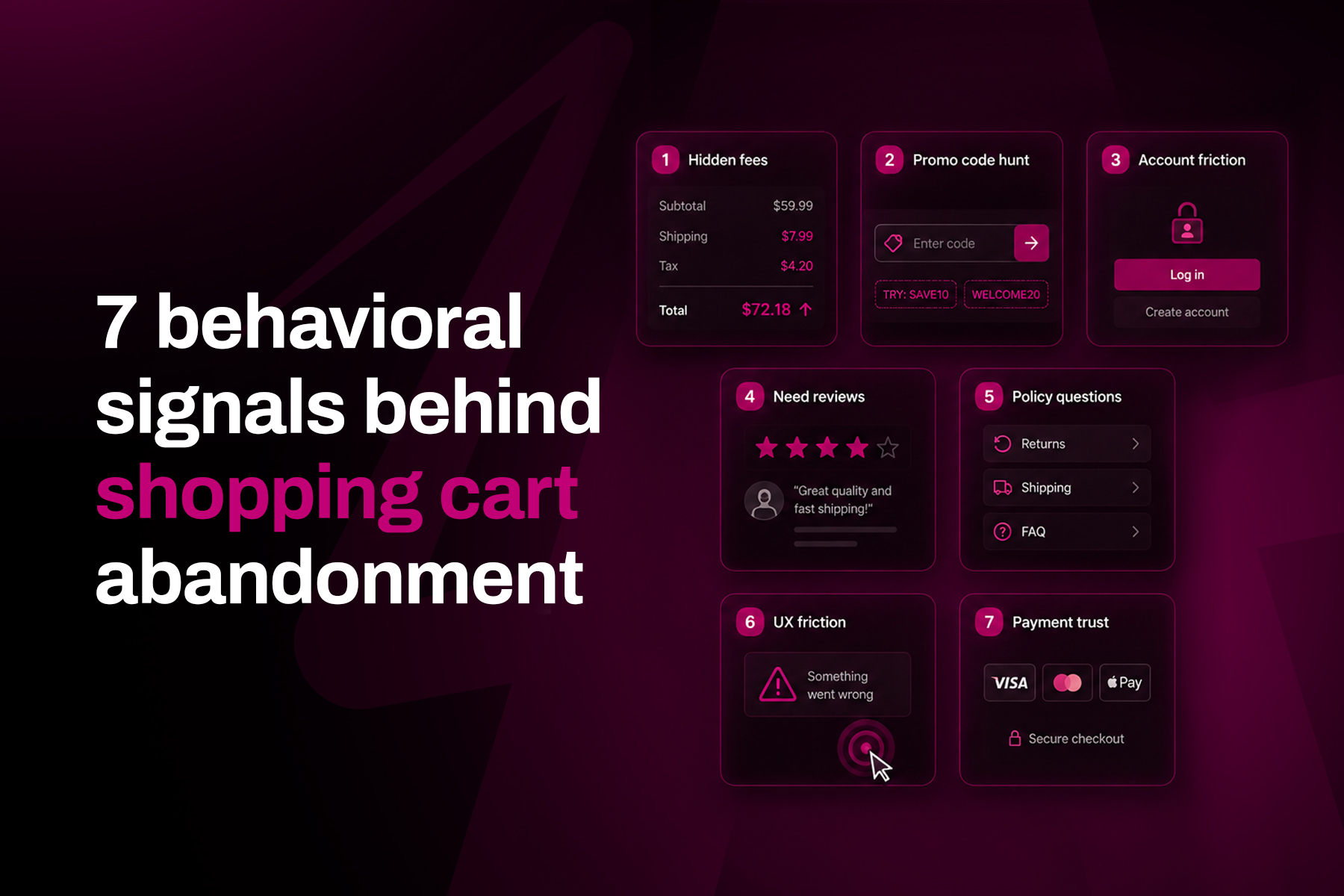
Unlike finding the seven dwarves or aligning all seven of your chakras, spotting these seven cart abandonment behavioral signals is surprisingly simple—if you heed our handy tips, of course.
1. Shoppers exit the moment shipping and fees appear
What it looks like
- A sharp drop-off on the shipping/tax step
- Abandonment spiking once the total updates
What it's telling you
- Your customers are suffering from “sticker shock”
This isn’t surprising considering 48% of shoppers abandon because extra costs (shipping, tax, fees) are too high. 21% bail because they couldn't see the total cost up-front.
How to fix it
- Lead with all-in pricing
- Show fees before checkout
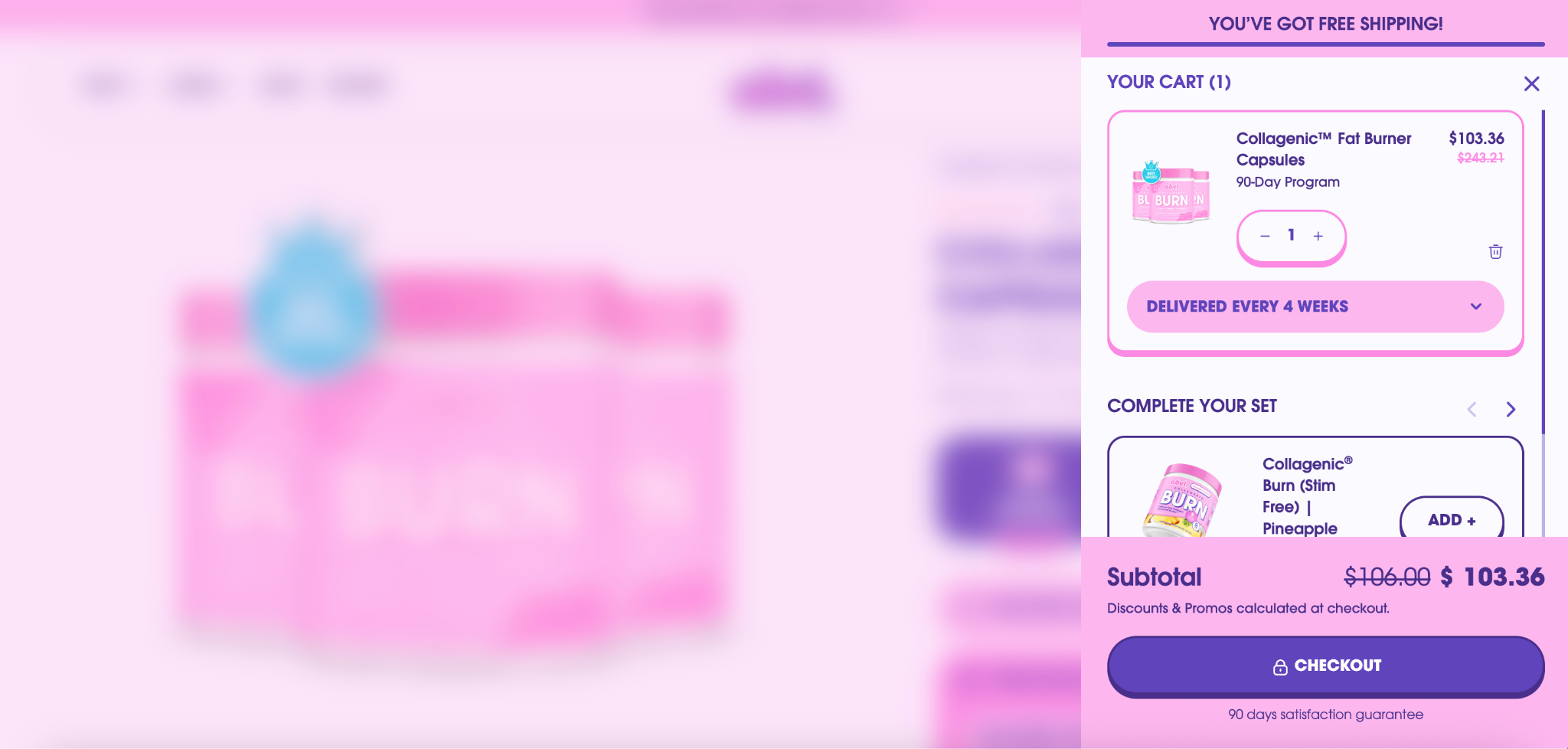
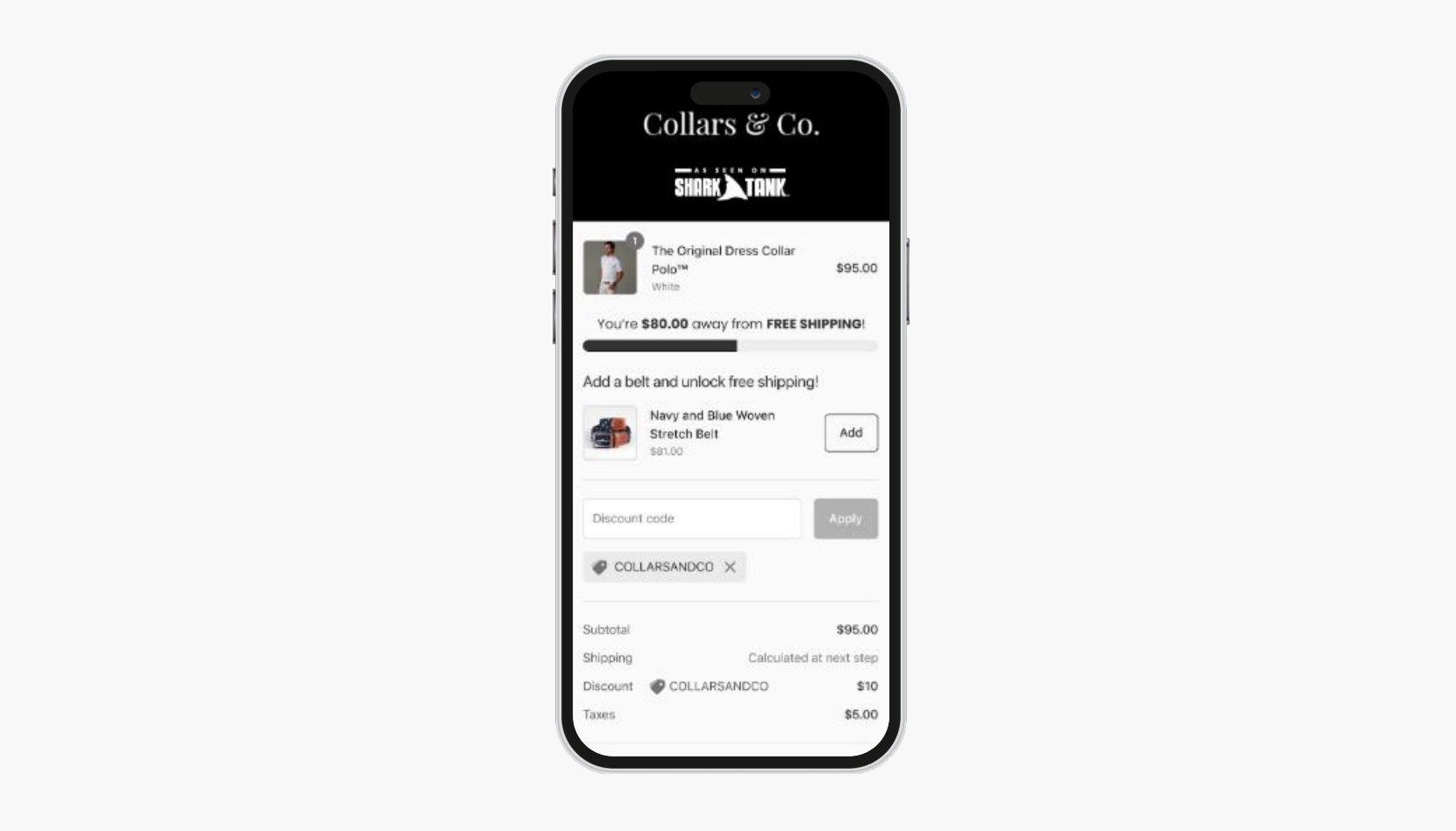
- Use a free shipping threshold bar in the cart to create the perception of a greater value-to-cost ratio
Obvi makes it incredibly obvious when a customer reaches the free shipping threshold. The rest of the site blurs out, highlighting the cart panel. Customers clearly see the shipping progress bar, the item they added, and any relevant upsells.
2. Shoppers stall on the promo-code box (or leave to hunt for coupons)
What it looks like
- A heatmap shows a lot of activity on the discount-code field
- Shoppers open a new tab to search "[brand] coupon”
- Shoppers reach out via live chat or email to ask if you have any discounts or promotions
What it's telling you
- These shoppers are price-sensitive and want a reason to commit now
How to fix it
- Put the incentive in front of them instead of sending them off-site
- Offer bundle discounts or a targeted cart/checkout offer
Keep the discount code field visually secondary when no public promotion applies. Too many competing offers can create decision fatigue, so test whether one clear incentive improves conversion rates while protecting average order values.
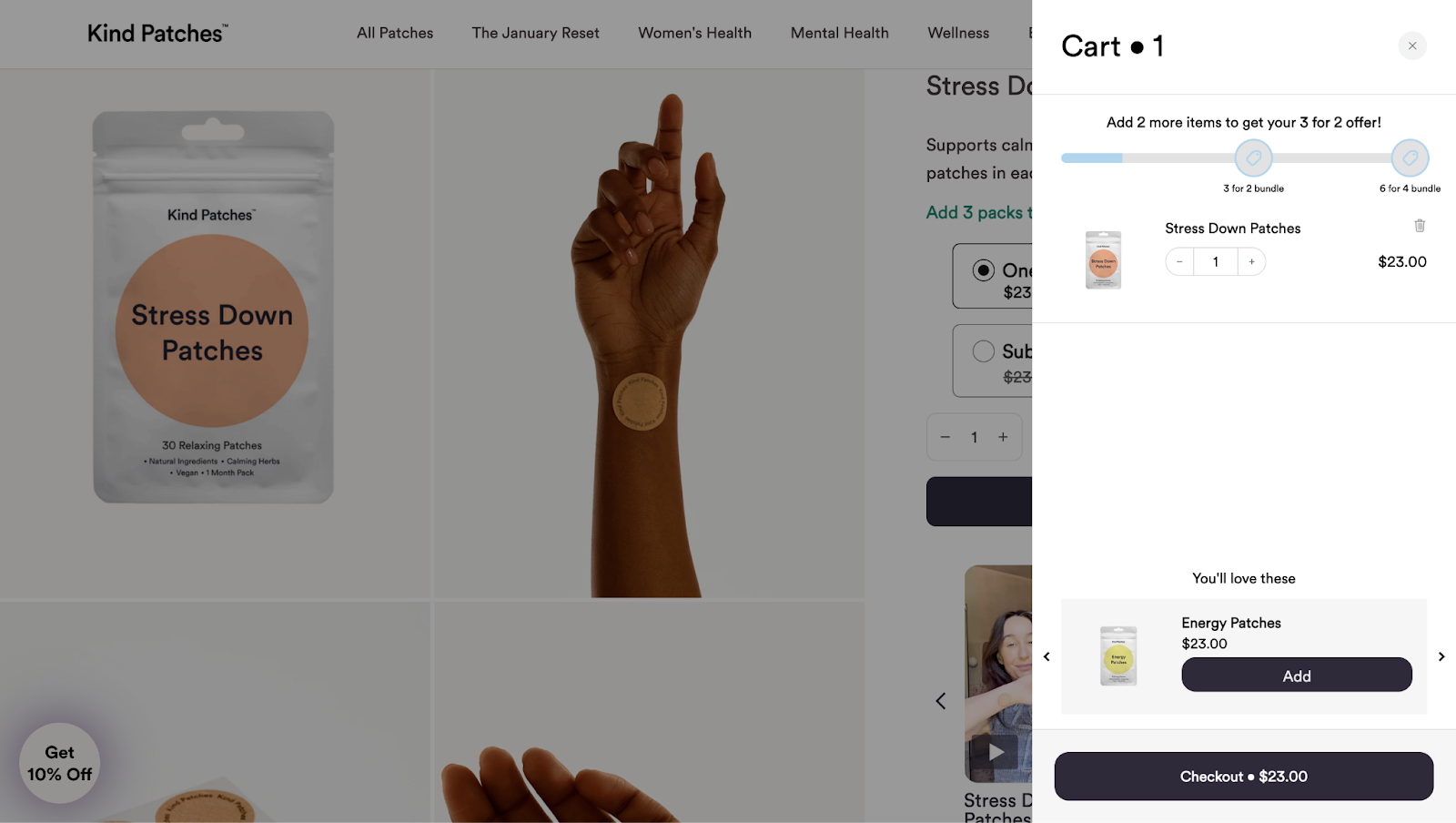
Instead of leaving an empty promo-code box, Kind Patches built the incentive into the cart experience. Customers see a tiered reward bar and a message to "Add 2 more items to get your 3 for 2 offer," along with tailored recommendations.
This allowed them to:
- Increase average order value (AOV) without creating pre-purchase friction
- Drive an 8.5% conversion rate on cart upsells
- Increase revenue 112% in 90 days
3. Drop-off spikes at the account-creation phase
What it looks like
- Shoppers start checkout, reach the create-account/login screen, and exit right there
What it's telling you
- Shoppers are feeling forced friction. In fact, 26% of customers abandon because the site wants them to create an account
How to fix it
- Offer guest checkout and move account/loyalty asks to after the sale
- Express payment and mobile wallet options can often identify customer information for you
Add autofill and recognizable digital wallets to shorten the checkout flow, especially on mobile. When it fits the product and audience, buy now, pay later (BNPL) can give shoppers another way to manage the purchase without forcing account creation.
4. Shoppers bounce back to reviews or the PDP before checking out
What it looks like
- Shoppers scroll down to the reviews section, return to the product page, or ping-pong between the PDP and cart
What it's telling you
- There’s a product-validation gap or lack of social proof
- The customer is hesitating based on a lack of trust
- Your customers need reassurance before committing
How to fix it
- Optimize PDPs and pull social proof directly into your cart and checkout
- Use reviews, UGC, and results-focused testimonials to reassure customers
- Trust-building checkout layouts (text + testimonials + cart controls + trust badges + images + upsells) earn ~$2.18 revenue per session
Strengthen the product description with sizing, materials, use cases, or other decision-critical details, then surface customer reviews and relevant trust signals close to the cart action. This gives hesitant shoppers the validation they need without sending them away from checkout.
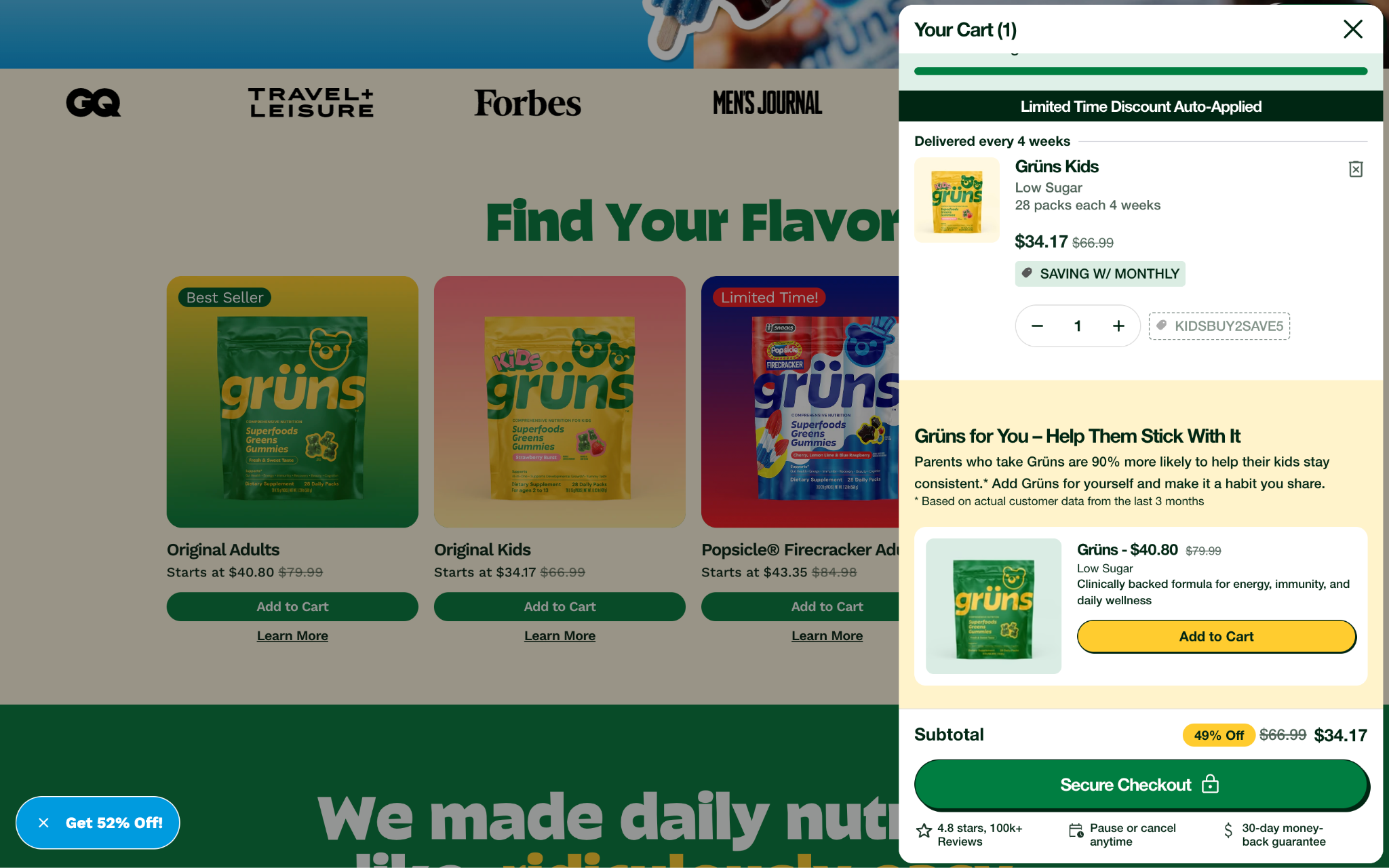
Grüns, for example, tailors its social proof based on the product. They built a customized cart with variant metafield logic to power dynamic pricing displays. Their cart also has cross-sell widgets between adult and kid product lines.
When a shopper adds a Grüns Kids item to their cart, they’re shown a relevant stat based on customers from the last 3 months: “Parents who take Grüns are 90% more likely to help their kids stay consistent.* Add Grüns for yourself and make it a habit you share.”
Tailoring social proof to your customer is a great tactic to increase conversions and drive upsells.
5. Shoppers detour to the FAQ/help/returns/shipping pages
What it looks like
- Mid-session navigation to the help center, returns policy, shipping, or warranty pages—then back to the cart (or gone completely)
What it's telling you
- Shoppers may have unresolved policy questions. This is especially important to know considering 23% of shoppers abandon over slow delivery and 18% over an unsatisfactory returns policy
How to fix it
- Make answers visible at the decision point instead of buried at the bottom of the page
- Put shipping timelines, returns/guarantee language and FAQs in the cart, checkout and confirmation pages
6. Shoppers are rapidly clicking, dead tapping, pinch-zooming or refreshing
What it looks like
- Rage clicks and dead taps in sessions
- Repeated refreshes
- Pinch-zooms on form fields
What it's telling you
- You may have broken or slow UX—and it's likely worse on mobile. 17% of shoppers abandon because the site had errors or crashed
- Remember that every friction point is expensive. 72.99% of Aftersell post-purchase orders are mobile, with top brands earning 70 to 90% of revenue on mobile.
How to fix it
- Repair bugs and broken links
- Tighten site speed
- Show customers where they are in the checkout experience
- Pressure-test mobile designs and the thumb-zone
7. Shoppers pause at the payment field, then exit without entering card details
What it looks like
- Dwell time spikes at the credit card step
- The cursor toggles away (often to check policies or reviews)
- The customer leaves without entering anything
What it's telling you
- There’s a payment-security trust freeze. 25% of customers abandon because they don't trust the site with their credit-card information
How to fix it
- Put trust where the hesitation happens
- Include security/certified-payment badges at the payment step
- Use recognizable express wallets (Shop Pay, Apple Pay, PayPal) that skip manual card entry
- Put clear guarantee cues in place
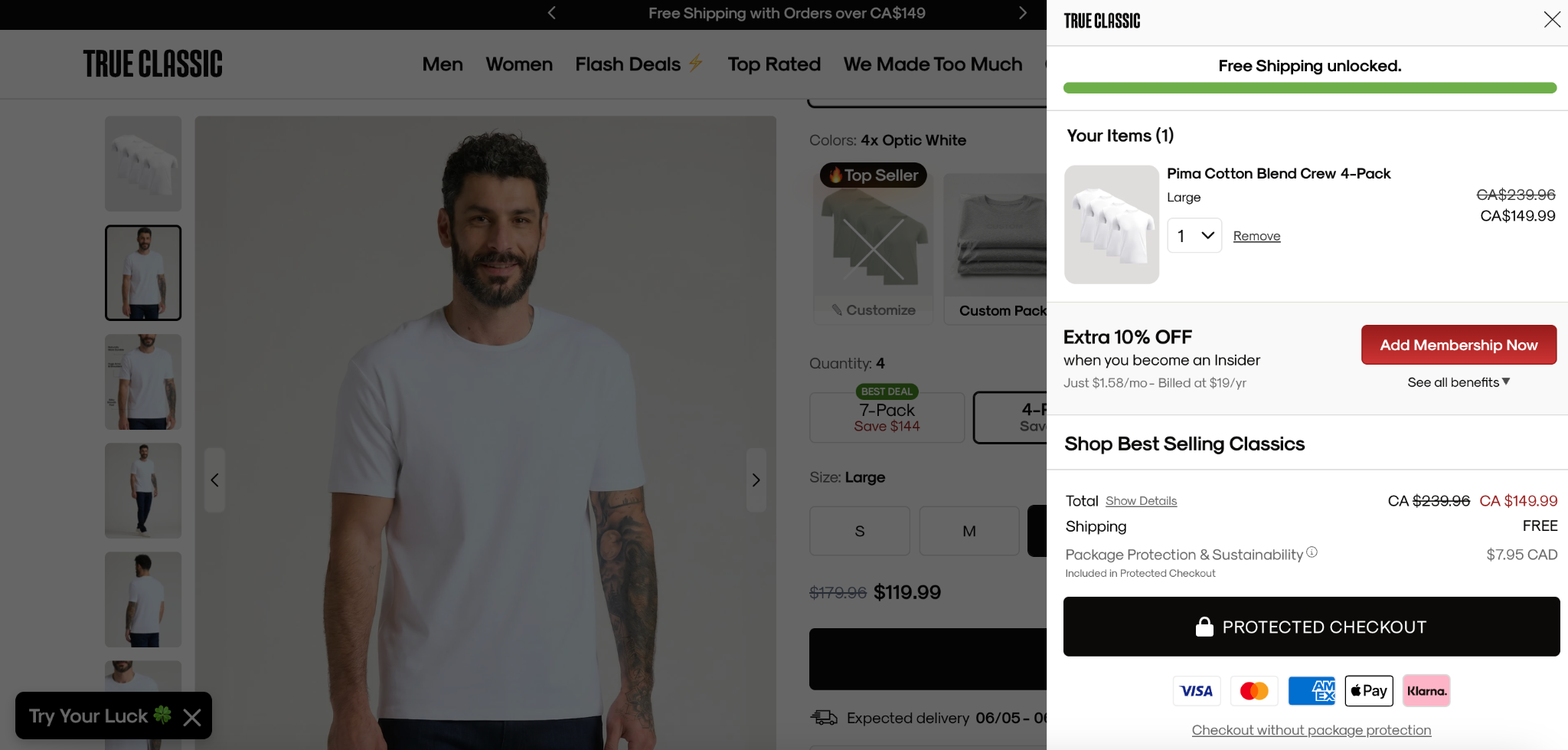
True Classic highlights many features to ease customer hesitation about payment security. This includes:
- Package protection options
- Secure checkout icons
- Certified payment logos like Visa, Mastercard, Amex, Apple Pay, and Klarna
When you miss the signal: how to recover and maximize
Even ace detectives miss a clue from time to time. But like Sherlock himself, you have to bounce back even better than ever if you want to catch your culprit… er, customer.
Here’s how to recover after a missed signal:
Catch the exit in the moment
Watch for exit-intent cues like the cursor racing toward the browser chrome on desktop or a fast upward scroll/back-gesture on mobile—with items still in the cart. You can trigger a last-chance offer or popup before the tab closes.
Recover after they leave
Use abandoned-cart email and SMS flows, plus retargeting, to bring high-intent shoppers back.
Maximize the saved order with post-purchase upsells
These offers are accepted in one click, with no re-entered payment and no disruption to the original checkout. Aftersell post-purchase upsells generated $100M+ in revenue across 4M+ upsold orders in 2025.
Kitsch rebuilt its post-purchase flow into native one-click upsells that were also on-brand. They leaned hard on A/B testing with zero disruption to the core checkout.
The results?
- 50% YoY post-purchase revenue growth
- 20% MoM growth in AOV and conversion
- 17% more accepted offers
The number of offers you show is its own lever
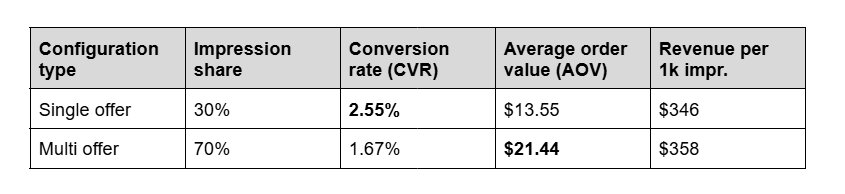
Less isn’t always more. According to Aftersell’s Revenue Leak Report, here are some insights on single vs. multi-offer placements:
- Single offers convert 53% higher than multi-offer placements (2.55% vs. 1.67%)
- But multi offers drive 58% higher AOV ($21.44 vs. $13.55).
- Revenue per 1,000 impressions lands nearly identical (~$346 vs. ~$358), so neither wins on total revenue
Overall, you need to match the offer count to your goal (CVR vs. AOV).
Measuring success: KPIs that actually move the needle
Like the proverbial tree in the forest, if you think you see a spike in conversions but didn’t measure it, did it really happen?
Use these quick solutions to help measure your success:
- Track micro-conversions: Per-step completion, add-to-cart → checkout rate, payment-step completion, recovery-email click-through rate (CTR).
- A/B test against a defined metric: Define the metric before you test. Like we saw in our data, there isn’t a one-size-fits-all when it comes to single vs. multi-product offers. It depends on if you’re optimizing for AOV or CVR.
Did you know: Aftersell brands average a 55.48% checkout conversion rate compared to the ~45% average across all Shopify brands.
Which cart modules should you prioritize?
Once you understand the signal behind cart abandonment, the next step is choosing a cart module that addresses it. The most frequently shown modules aren’t necessarily the ones generating the most revenue per session.
For example, in Aftersell’s Revenue Leak Report, rewards appeared across 43.2 million sessions but generated $0.46 in revenue per session. Add-ons appeared in only 2.5 million sessions yet produced $4.33 per session—the strongest result among the modules analyzed.
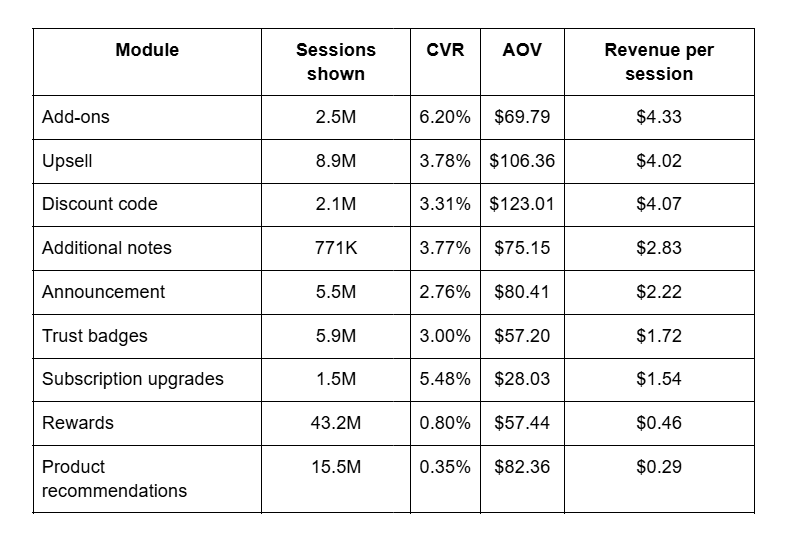
The difference may come down to decision friction. An add-on is often presented as a simple toggle rather than a separate purchase. Shoppers can opt into shipping protection, a small complementary item, or an optional service that is already framed as part of the order. That requires less deliberate choice than evaluating another product and clicking “add to cart.”
This doesn’t mean every merchant should replace product recommendations with add-ons. It means the module should match the behavior you’re trying to address.
A discount code may help a price-sensitive shopper, while trust badges can reassure someone who pauses over security concerns.
Why combining cart modules can work
The data also suggests that carts with several active modules can outperform carts relying on one isolated element. Sessions with three or four modules had substantially higher module CVR and revenue per session than sessions with only one or two modules.
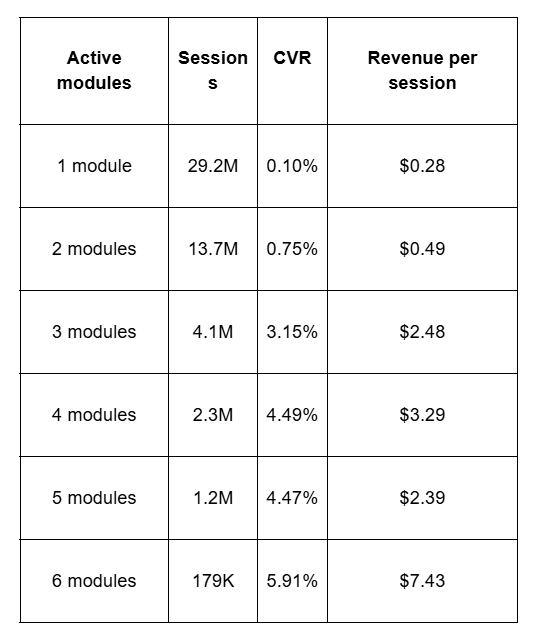
This isn’t simply a case of showing more offers. Different modules address different cart abandonment behavior. A rewards bar moves customers toward a spending threshold.
An upsell presents a relevant complementary product. An add-on provides a low-friction option such as order protection. A trust badge reduces hesitation. Together, these modules can address several friction points within the same checkout flow.
Still, more isn’t automatically better. Revenue per session declined from four to five modules, and the six-module result is based on a much smaller sample.
Use A/B testing to find the smallest combination that addresses your customers’ needs without creating clutter or decision fatigue.
Catch shoppers before they leave with these 7 simple steps
You know how to spot the cart abandonment behavioral signals. You even know how to recover and maximize if you miss them.
But even if you completely skipped the rest of this article (shame on you!), here’s a summary of how to reduce cart abandonment in 7 steps or less:
- Map drop-off by step.
- Remove any shipping surprises and put the incentive in the cart.
- Offer guest checkout.
- Bring social proof and policy answers into the cart/checkout.
- Fix mobile UX and add trust/express payments at the payment step.
- Layer exit-intent, recovery and post-purchase into your strategy.
- A/B test against one defined metric.
So go forth, newly-annointed supersleuths. With these handy tips and Aftersell’s solutions in your pocket, you’ll easily be able to solve the Case of the Abandoned Shopping Cart.
You might say it’s elementary, my dear readers.
.jpg)